PAGE 2
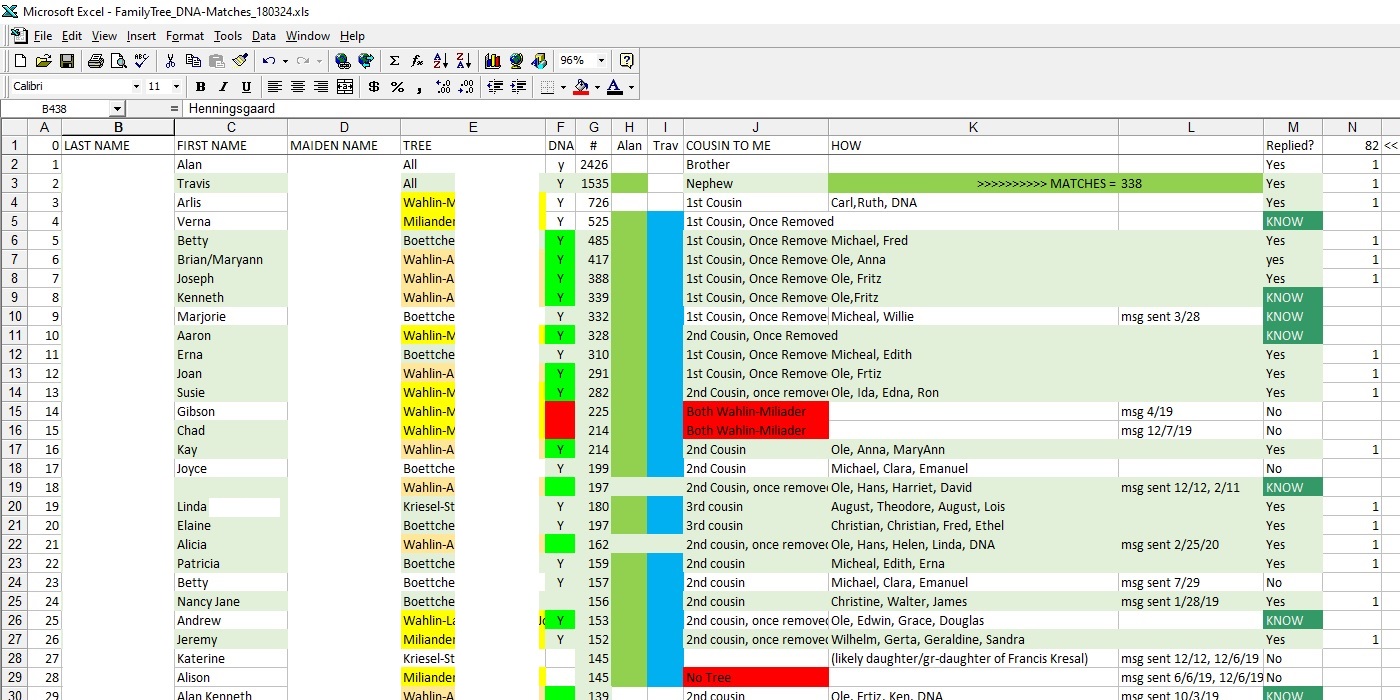
| 1 | Here I have taken the time to put all the names into an Excel spread sheet. So far, I haven't used the sort so doing the same thing on a Word type document would work. Doing it on paper is a little harder because I keep adding people to the middle of it. | |||
| 2 | NAMES are just for ID, the name fields do not have to be in any order. Some people use just their initials or their the first part of their email address which does make it harder to ID them. | |||
| 3 | TREE Here I use the last names of my grandparents at the top of that branch. Grandparents for 1st cousins, Great-Grandparents for 2nd cousins, etc. | |||
| 4 | DNA - field was added before I had taken the DNA test. Now everyone on this sheet is from the DNA table so it is no longer needed. | |||
| 5 | # - This shows how close of a match you are. There is a wide range within each group. | |||
| 6 | Alan/Travis - more fields that I no longer use on this table. I have created a 2nd table when I try to 'triangulate.' Where I look to see if others are related to the a 3rd person. | |||
| 7 | COUSIN TO ME - This is how these people are actually related to me, not based on DNA | |||
| 8 | HOW - Is how those people are related. I include our common ancestor and then list their ancestors from there down to them. | |||
| 9 | In this next field I was keeping track of when I sent each person a message. Some will never answer. In some cases they have died, but I don't have a way of flagging that on here yet. | |||
| 10 | REPLIED | |||
| 11 | The number after replied is how many have replied. I have contacted over 200 people so I am getting about 1/3 to reply but I have been able to ID about 1/2 between those that reply and those that I can find out information other ways. | |||
| 12 | The coloring on here changes every time I look at something different. It likely started with ID'ing people into my four grandparents. |